I've been wanting to actually build something with LangGraph and OpenRouter instead of just reading about them, so I picked a small, self-contained problem: an interview-prep bot. The user chats with it on Telegram: it generates an interview question (behavioural or technical, for a software engineering role by default, though the role can be changed), the user answers it, and it gives the user feedback on how they can reframe it properly. The app should be able to understand if your message is a response for the interview question or a follow-up question for clarification, etc.
This post walks through how it's built and a demo at the end.
The workflow is as follows:
- The user sends
/generate_questionsto the bot. - The bot submits a request to the LLM (via OpenRouter) to generate an interview question and sends it back to the user on Telegram.
- The user replies with either an attempt at answering it or a follow-up (a clarifying question, a request for a hint, etc.).
- The bot classifies which of those two the user message is, then either generates feedback on the user's answer or replies to the user's follow-up.
Architecture
At a high level, a message flows through the system like this:
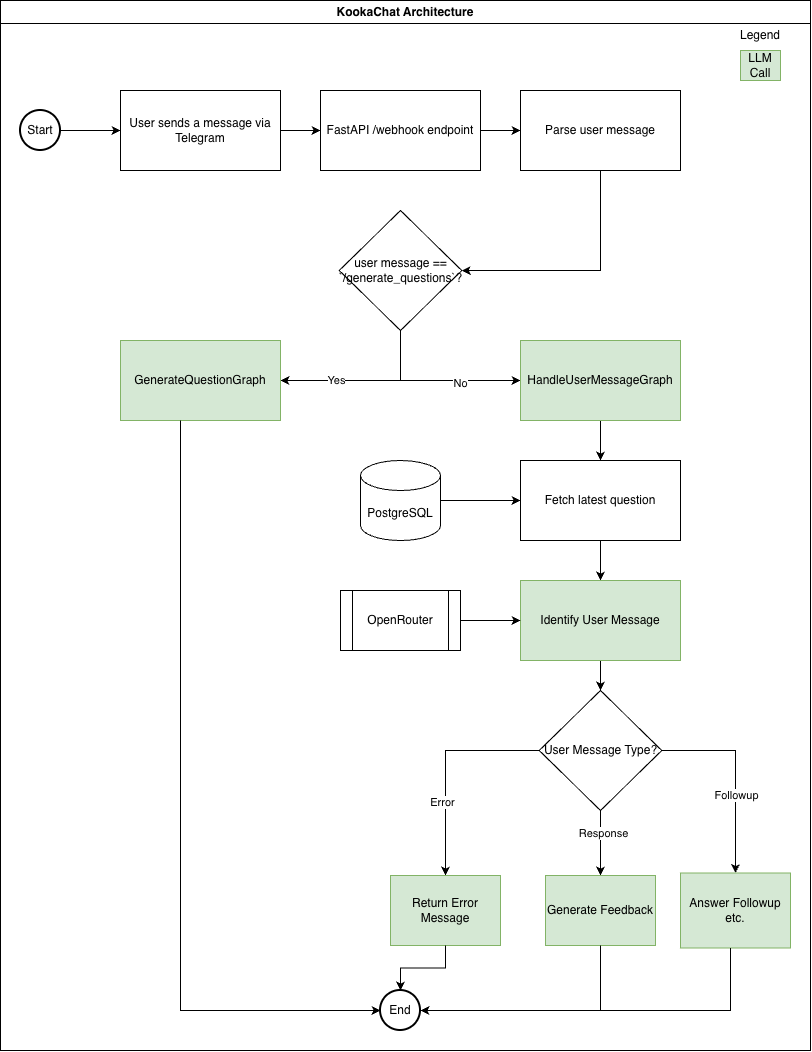
Every user request Telegram sends hits the same endpoint. The handler pulls the message text and the sender's chat ID out of the payload, then goes to either GenerateQuestionGraph or HandleUserMessageGraph depending on the sender's message. Both branches end the same way: the graph's output string is passed through to_telegram_markdown_v2, POSTed to the Telegram Bot API's sendMessage endpoint for that chat_id, and saved as a new Message row in the database.
GenerateQuestionGraph
This graph is a single node — it just calls the LLM once and returns.
The generate_questions builds the system prompt from GENERATE_QUESTION_PROMPT (filled in with a question count, question type and target role), POSTs it to OpenRouter's chat completions endpoint, and pulls the model's reply into state["final_answer"].
HandleUserMessageGraph
This graph has more branches, since it has to figure out what kind of message the user just sent before it can respond to it.
First it fetches the latest question in the database, then injects that question along with the user's message into a prompt where it calls the LLM to identify whether the user's message is a response to the question or a followup question. If it's a response, it generates feedback; if it's a followup, it answers the user's question; otherwise it returns an error message. All the conversations from the user and the messages sent by the bot are saved to the database so it can accurately answer the user's questions based on the previous conversation.
Libraries used
| Library | Purpose |
|---|---|
| FastAPI | Web framework serving the /webhook and /health endpoints |
| Uvicorn | ASGI server that runs the FastAPI app |
| LangGraph | Defines the bot's logic as small, explicit state graphs |
| SQLModel | ORM/schema layer over Postgres, built on SQLAlchemy + Pydantic |
| Alembic | Database migrations |
| psycopg (binary) | PostgreSQL driver |
| requests | Plain HTTP calls to the OpenRouter and Telegram Bot APIs |
| OpenRouter | Single API that routes to many different LLMs |
| ngrok | Tunnels a public HTTPS URL to the local machine, so Telegram can reach the webhook before it's deployed anywhere |
Step-by-step guide
Here's the order these actually need to happen in.
1. Create a Telegram bot with BotFather
Telegram bots are registered through a bot called @BotFather, directly inside Telegram.
- Open Telegram and search for
@BotFather(verified, blue checkmark). - Send
/newbot. - Give it a display name (e.g. "Kookachat"), then a unique username ending in
bot(e.g.kookachat_bot). - BotFather replies with an API token that looks like
123456789:AAF.... Save it — this is theTELEGRAM_BOT_TOKEN.
2. Get an OpenRouter API key
OpenRouter is what the bot calls to actually generate questions, feedback, and replies.
- Go to openrouter.ai and sign up.
- Go to API Keys in the account settings and click Create Key.
- Copy the key — it looks like
sk-or-v1-.... This is theOPENROUTER_API_KEY. - Pick a model to use (e.g. a Gemma or Llama model) — set this as
MODEL. OpenRouter's models page lists what's available and their pricing; some have free tiers. - Note the chat completions endpoint,
https://openrouter.ai/api/v1/chat/completions— this is theOPENROUTER_API_URL.
3. Set up the project
Set up the project as usual, including the environment variables, db migrations, and starting the server.
4. Expose the local server with ngrok
Telegram delivers messages by sending an HTTPS POST request to a webhook URL registered with it — it needs to be able to reach the server over the public internet. Since the app isn't deployed anywhere yet and is just running on localhost:8000, Telegram's servers can't reach it directly. ngrok solves this by opening a secure tunnel from a public HTTPS URL to the local port, so Telegram can reach a server sitting on the local machine.
- Sign up for ngrok and install the CLI.
- Authenticate the CLI with the ngrok authtoken (shown in the ngrok dashboard):
ngrok config add-authtoken <your-authtoken> - Start the tunnel, pointing at the port
uvicornis running on:
Or, without a reserved domain:ngrok http --url=<your-static-domain> 8000ngrok http 8000 - ngrok prints a public
https://...forwarding URL — that's what gets passed to Telegram in the next step.
5. Register the webhook with Telegram
Now tell Telegram where to send updates, using the bot token and the public ngrok URL from the previous step:
curl "https://api.telegram.org/bot<your-telegram-bot-token>/setWebhook?url=<your-ngrok-url>/webhook"
A successful response looks like {"ok":true,"result":true,"description":"Webhook was set"}. It can be verified at any time with:
curl "https://api.telegram.org/bot<your-telegram-bot-token>/getWebhookInfo"
9. Test it
Open a chat with the bot on Telegram and send:
/generate_questions
It should reply with an interview question. Answer it (or ask a follow-up) and the bot should respond with feedback or a reply, formatted in Telegram's MarkdownV2.
Here's the demo
What's next
Right now the bot only exists as long as your machine, your server, and the ngrok tunnel are all up at once, which is fine for testing but not something you'd actually want to rely on. Next up is deploying it somewhere with a stable URL and pointing the webhook there instead of ngrok, so I can stop babysitting a terminal window every time I want to practice a question.
That's it for this one. If you build your own copy, I'd genuinely like to know what you use it for.